Showing posts with label IBM BI Products. Show all posts

Friday, August 30, 2013

IBM Cognos TM1 Integration with IBM Cognos BI

Source:http://www.ironsidegroup.com/

IBM Cognos Tabbed Report Design

Source:http://www.ironsidegroup.com/

Making the Most of IBM Information On Demand (IOD)

Source:http://www.ironsidegroup.com/

Monday, June 17, 2013

IBM Cognos Express: Addressing the Business Intelligence Needs of Mid-Size Companies

Source:http://www.ironsidegroup.com/

Friday, June 7, 2013

How to Implement a Dynamic Page Break Using an Optional Filter

Page Breaking is a useful feature to offer report consumers. However, it’s often difficult to do this if the item you want to break on is dynamic. Here we show you how to do this with cascading, optional prompts while page breaking on the lowest level chosen.

Step by Step Instructions:
The following set of instructions show a sample JavaScript implementation in a Cognos8.2 environment, using the Cognos provided Go Sales and Retailers package. It was tested on IE 6.0 and IE 7.0.  JavaScript will need to be upgraded for Cognos 8.3 and above.
1. To get started, let’s create a simple list report with the following fields:
1
2.  Create a prompt page with product line, product type and product as optional cascading value prompts; name each prompt object with name “pLine”, “pType” and “pProduct” respectively.
You will have the Product Type prompt cascaded by Product Line, and the Product prompt cascaded by Product Type.
Hint: to name each prompt object click on the object then on the right properties panel under Miscellaneous ->Name

2
3. Add  optional filters “ pLine, pType, pProduct”  to the report query:
3
4. Test the report to make sure it is working correctly at this point
5. Add a new hidden text box prompt onto prompt page. Name it as “pLevel”, set default value to “pALL”.  This text box prompt value will be used to determine the lowest prompt level that a user selects.  When the user hits the customized “Finish” button” (see below) a JavaScript function will go through each prompt and dynamically set this hidden text box prompt value to the corresponding level the user has selected.
4
6. Delete “Finish” button on prompt page. Drag a new HTML item and create a new custom “Finish”  button using the following HTML code:
<button type=”button” name=”finish99″ id=”finish99″ onclick=”assignParamValue()” style=”"
class=”bp” onmouseover=”" onmouseout=”" onkeypress=”return preventSubmitEvent(event);”>

Finish</button>
7. Add another HTML item onto prompt page and paste in the following JavaScript:


<script>
var f=document.forms["formWarpRequest"];
function assignParamValue()
{
var tmp=”";

if (f.elements["_oLstChoicespLine"])
{
if( f.elements["_oLstChoicespLine"].selectedIndex>=0 )
tmp=’pLine’;
}

if (f.elements["_oLstChoicespType"])
{
if( f.elements["_oLstChoicespType"].selectedIndex>=0)
tmp=’pType’;
}

if (f.elements["_oLstChoicespProduct"])
{
if( f.elements["_oLstChoicespProduct"].selectedIndex>=0)
tmp=’pProduct’;
}

if(tmp==”") tmp=’pALL’;
f.elements["_textEditBoxpLevel"].value = tmp;

//uncomment for debugging
//alert (‘Page set breaks by ‘+document.forms["formWarpRequest"].elements["_textEditBoxpLevel"].value);
promptButtonFinish(); //submit request

}
</script>

8. Now add a new data item to report query, name it as “pagebreak by”. Use the following expression:


if (?pLevel? =’pProduct’)
then ([gosales_goretailers].[Products].[Product name])
else if (?pLevel?=’pType’)
then ([gosales_goretailers].[Products].[Product type])
else if (?pLevel?=’pLine’)
then ([gosales_goretailers].[Products].[Product line])
else (‘ALL’)

9. Set up page breaking for the report and group it by the “pagebreak by “ data item you just created:
5
10. Click on Page1, then on Properties Panel click on “Master Detail Relationships”. Define the master detail relationship from “pagebreakby” to “pagebreakby”.
6
11. Go back to report page. Drag “pagebreak by” data item to report title area:
7
12. Run the report. If you select two product types then the report should return two pages.  The report title should also dynamically change base on page break:


Prompt page:
8
Sample Report Page 1:
9
Sample Report Page 2:
10

Source :http://www.ironsidegroup.com/
October 27, 2009 by Susan Ma

Thursday, June 6, 2013

TM1 – The Mystery Unveiled

TM1 – The Mystery Unveiled


Just about two years ago, before Cognos was acquired by IBM, Cognos did some acquiring of its own. Cognos purchased Applix and its flagship product, TM1. With the subsequent news regarding Cognos’ acquisition, TM1 and its integration into the Cognos suite of products became a minor press release. That’s about to change.
As industry analysts look at the emerging BI landscape, two common themes keep appearing:
1. Organizations recognize the value of increasing their use of Performance Planning.
2. Speed and virtually real time data access is becoming crucial to maintaining an organizations competitive advantage.
Not only will TM1 provide the technology to address these issues, but it will open up a whole new world of BI for your organization.
IBM Cognos TM1 is an in-memory MOLAP (Multidimensional Online Analytical Processing) database server most often used to implement collaborative planning, budgeting and forecasting solutions, as well as analytical and reporting applications. The technology is similar to PowerPlay (if you are an existing Cognos user) but with some VERY noticeable differences. First of all, TM1 supports “write-back” capability which enables users to edit values through a myriad of customer facing applications and modify values contained in the cube. This is what makes TM1 the ideal fit for planning and forecasting types of applications. Add plans or forecasts to a scenario dimension, and you’re off and running with Plan vs. Actual comparisons. It’s also great for “What-If” analysis, making it easy to examine complex changes while making adjustments for factors such as interest rates, fuel prices or exchange rates, not to mention ever-changing sales forecasts.
That’s not the only difference. TM1 is an “in-memory” 64 bit database. That means it’s extremely fast all the while supporting a large number of dimensions with an enormous number of members. Recently, 2 competitor cubes taking 8 and 2 hours respectively to build, were replaced with a single TM1 cube which built in 1 hour. Did I mention that it was fast? The competitor required 2 cubes because it couldn’t handle both the daily detail and the two year history in single cube, TM1 handled two years of daily details, and loaded in a fraction of the time.
TM1 has quite a number of other features as well:
  • The ability to create or modify subsets or views of the data on the fly, which allows for custom groupings of members.
  • Rules based calculations, for complex calculations.
  • The application is server based, for large-scale implimentations.
  • Values updated are immediately available to all users.
New products? Rearranged sales territories? Workforce realignment? No problem.
While TM1 includes an Excel and a web interface, it also can serve as a data source for Cognos 8. This opens up possibilities for using Report, Analysis, and Query Studios, and all the capabilities within those tools.
This is not a complete list of features by any means, but you can get the picture. Suddenly, there is a game-changing technology easily available for use as a multi-dimensional cube or even a reporting data mart. User requirements and functionality that once prevented the use of an OLAP application can now take full advantage of the speed and convenience of cube technology.

Source : http://www.ironsidegroup.com/

How to Enhance Text Box Prompts in IBM Cognos 8 with On-The-Fly Validation

How to Enhance Text Box Prompts in IBM Cognos 8 with On-The-Fly Validation

One of the issues with using text box prompts is the possibility of receiving incorrect, misspelled, or non-existent entries. This allows the report to run and return unexpected data. Recognizing this, a user would have to return to the prompt page to re-enter values into the text box prompt. Wouldn’t it be nice if there was a way to automatically validate entries against some specified rules while remaining on the prompt page?
In this example we’ll show you how to validate user entry of 3 digit numeric codes with a 5 code maximum.
You can change the code according to your own requirements.
This method will display error messages to the user when their entries do not conform to these rules.

Here is how:

1) Create a new IBM Cognos 8 Report Studio report.
2) Add a prompt page to your report.
3) From the Toolbox menu, drag a Text Box Prompt object onto your prompt page. The “Prompt Wizard” opens. Leave the default parameter name and click Finish.
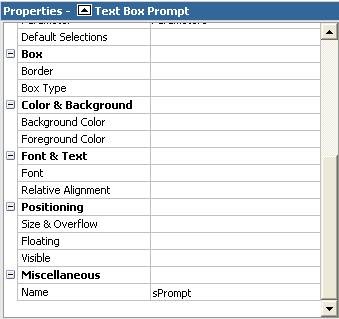
4) Select the prompt object and assign it a name by navigating to the Properties area (bottom left of the page) and entering a value in the Name property, which can be found in the Miscellaneous section at the bottom of the list (this example uses a prompt object named “sPrompt” and this will be referenced in the JavaScript).
clip_image003
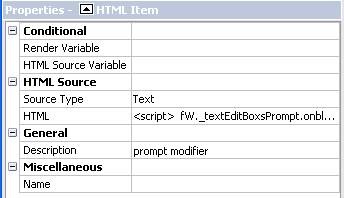
5) And now the fun part! Drag an HTML Item object directly to the right of the prompt. Assign its’ Description property the following value: prompt modifier.
TIP: Adding descriptions to your HTML Items makes it easier to identify them later when more than one is present in the report.
clip_image006
6) Now enter the following code into this HTML Item by either double-clicking it or select the HTML property:
<script>
fW._textEditBoxsPrompt.onblur=validatePrompt;
</script>
This code will make our prompt run the “validatePrompt” function every time it loses focus.
7) Now, we will add a second HTML Item to top of the page to hold our functions. Once the HTML Item is added to the report, describe the item by going to the Description property and typing in “functions”. Your prompt page should now look like the image below:
clip_image008
8 ) The following code will allow users to enter a maximum of five (5) numeric codes separated by commas. Any other characters that are encountered will throw an error. The section for a proper validation was purposely left blank to allow readers to enter their own success message or routine.
<script>
var fW=(typeof getFormWarpRequest == “function” ?
getFormWarpRequest() :document.forms["formWarpRequest"]);
function validatePrompt()
{
str=fW._textEditBoxsPrompt.value;
if (!(str==null||str==”"))
{
str=str.toUpperCase();
str= str.replace(/ /g, “”); // remove all spaces
str= str.replace(/,+/g, “,”); // replace multiple commas by one
str= str.replace(/,$/g, “”); // remove trailing comma
str= str.replace(/^,/g, “”); // remove leading comma
var patvalidchar = new RegExp(“^[0-9,]+$”);
var pat3char=new RegExp(“^([0-9]{1,3},)*$”); // 3 digit code
var pat5char=new RegExp(“^([0-9]{1,3},){0,5}$”); //more then 5 codes

// characters other than numbers were used…
if (patvalidchar.test(str)==false)
alert(“Codes may be comprised of only numbers.”);

// codes are more than 3 digits long and only numeric …
else
{
if (pat3char.test(str + “,”)==false)
alert(“Codes must be at least three digits.”);

// more than 5 codes were entered …
else
{
if (pat5char.test(str + “,”)==false)
alert(“Please enter no more than 5 codes”);

// Enter code here for successful validation …
else
{
return true;
}
}
}
}

// Enter code here if Text Box is Empty …
else
{
alert(“No values entered.”);
}
}
</script>

 ------------------

Source: Irongroupside.com

Friday, May 24, 2013

Comparison of OLAP Servers

The following tables compare general and technical information for a number of online analytical processing (OLAP) servers. Please see the individual products articles for further inforation.

eneral information

OLAP Server Company
Latest stable version Software license License Pricing
Essbase Oracle
11.1.2.1 Proprietary
icCube MISConsulting SA
3.0.3 Proprietary community/enterprise
Microsoft Analysis Services Microsoft
2012 Proprietary
MicroStrategy Intelligence Server MicroStrategy
9 Proprietary -
Mondrian OLAP server Pentaho
3.4.0 EPL free
Oracle Database OLAP Option Oracle
11g R2 Proprietary
Palo Jedox
3.2 SR3 GPL v2 or EULA -
SAS OLAP Server SAS Institute
9.3 Proprietary -
SAP NetWeaver BW SAP
7.20 Proprietary -
TM1 IBM
10.1.1 Proprietary -

Data storage modes

OLAP Server MOLAP ROLAP HOLAP Offline
Essbase Yes Yes Yes
icCube Yes No No Offline Cubes
Microsoft Analysis Services Yes Yes Yes Local cubes,
PowerPivot for Excel
MicroStrategy Intelligence Server Yes Yes Yes MicroStrategy Office,
Dynamic Dashboards
Mondrian OLAP server No Yes No
Oracle Database OLAP Option Yes Yes Yes
Palo Yes No No
SAS OLAP Server Yes Yes Yes
IBM TM1 Yes No No
IBM Cognos Yes No Yes
SAP NetWeaver BW Yes Yes No

APIs and query languages

APIs and query languages OLAP servers support.
OLAP Server XML for Analysis OLE DB for OLAP MDX Stored procedures Custom functions SQL LINQ[11] Visualization
Essbase Yes Yes Yes Java Yes No Yes ?
icCube Yes Yes Yes Java Yes No Yes Java, Javascript
Microsoft Analysis Services Yes Yes Yes .NET[12] Yes[13] Yes[14] Yes ?
MicroStrategy Intelligence Server Yes No Yes Yes Yes Yes Yes ?
Mondrian OLAP server Yes Yes[15] Yes No Yes[16] No Yes ?
Palo Yes Yes Yes Cube Rules, SVS Triggers Yes No Yes ?
Oracle Database OLAP Option No Yes[17] Yes[17] Java, PL/SQL, OLAP DML Yes Yes[18] No ?
SAS OLAP Server Yes Yes Yes No No No Yes ?
SAP NetWeaver BW Yes Yes Yes No Yes No Yes ?
TM1 Yes Yes Yes Yes Yes No Yes ?

OLAP features

OLAP Server Parent-child hierarchies Multiple time hierarchies Semi-additive measures Write-back Measure Groups Partitioning
Essbase Yes Yes Yes Yes Yes Yes
icCube Yes Yes Yes Yes Yes Planned
Microsoft Analysis Services Yes Yes Yes Yes Yes Yes
MicroStrategy Intelligence Server Yes Yes Yes Yes ? Yes
Mondrian OLAP server Yes Yes No Planned ? No
Oracle Database OLAP Option Yes ? Yes Yes ? Yes
Palo Yes ? ? Yes ? ?
TM1 Yes Yes[21] Yes Yes ? No
IBM Cognos Yes Yes Yes No ? Yes
SAS OLAP Server Yes Yes Yes Yes Yes Yes
SAP NetWeaver BW Yes Yes Yes Yes ? Yes

System limits

OLAP Server # cubes # measures # dimensions # hierarchies in dimension # levels in hierarchy # dimension members
Essbase  ?  ?  ? 256  ? 20,000,000 (ASO), 1,000,000 (BSO)
icCube 2,147,483,647 2,147,483,647 2,147,483,647 2,147,483,647 2,147,483,647 2,147,483,647
Microsoft Analysis Services[23] 2,147,483,647 2,147,483,647 2,147,483,647 2,147,483,647 2,147,483,647 2,147,483,647
MicroStrategy Intelligence Server Unrestricted1 Unrestricted1 Unrestricted1 Unrestricted1 Unrestricted1 Unrestricted1
SAS OLAP Server[24] Unrestricted1 1024 128 128 19 4,294,967,296
1 Please update as 'unrestricted', is just not possible

Security

OLAP Server Authentication Network encryption On-the-Fly1 Data access
Cell security Dimension security Visual totals
Essbase Essbase authentication, LDAP authentication SSL  ? Yes Yes Yes
icCube HTTP Basic/Form Authentication, Windows SSO (NTLM,Kerberos) SSL Yes Yes Yes Yes
Microsoft Analysis Services NTLM, Kerberos SSL and SSPI  ? Yes Yes Yes
MicroStrategy Intelligence Server Host authentication, database authentication, LDAP,
Microsoft Active Directory, NTLM, SiteMinder, Tivoli, SAP, Kerberos
SSL, AES[25]  ? Yes Yes Yes
Oracle Database OLAP Option Oracle Database authentication SSL  ? Yes Yes ?
Palo Palo authentication, LDAP, Microsoft Active Directory SSL Yes Yes Yes ?
SAS OLAP Server[26] Host authentication,SAS token authentication, LDAP, Microsoft Active Directory Yes[27]  ? Yes Yes Yes
1 On-the-Fly : The ability to define authentication dynamically via programmatic interfaces. New users do not require restarting the server or redefining the security.

Operating systems

The OLAP servers can run on the following operating systems:
OLAP Server Windows Linux UNIX z/OS
Essbase Yes Yes Yes No
icCube Yes Yes Yes Yes
Microsoft Analysis Services Yes No No No
MicroStrategy Intelligence Server Yes Yes Yes No
Mondrian OLAP server Yes Yes Yes Yes
Oracle Database OLAP Option Yes Yes Yes Yes
Palo Yes Yes Yes No
SAS OLAP Server Yes Yes Yes Yes
SAP NetWeaver BW Yes Yes Yes Yes
TM1 Yes Yes Yes No
Note (1):The server availability depends on Java Virtual Machine not on the operating system

Support information

OLAP Server Issue Tracking System

Source code
Essbase myOracle Support

Closed
icCube Bugzilla

Open
Microsoft Analysis Services Connect

Closed
MicroStrategy Intelligence Server MicroStrategy Resource Center

Closed
Mondrian OLAP server Jira

Open
Oracle Database OLAP Option myOracle Support

Closed
Palo Mantis

Open
SAS OLAP Server Support

Closed
SAP NetWeaver BW OSS

Closed
TM1 IBM Service Request

Closed

Tuesday, May 14, 2013

What is IBM Cognos TM1 ?


 -----------------------
IBM Cognos TM1 (formerly Applix TM1) is enterprise planning software used to implement collaborative planning, budgeting and forecasting solutions, as well as analytical and reporting applications. Data in IBM Cognos TM1 is stored and represented as multidimensional OLAP cubes, with data being stored at the "leaf" level. Computations on the leaf data are performed in real-time (for example, to aggregate numbers up a dimensional hierarchy). IBM Cognos TM1 includes a data orchestration environment for accessing external data and systems, as well as capabilities designed for common business planning and budgeting requirements (e.g. workflow, top-down adjustments).