Friday, June 7, 2013

Understanding the Cognos Application Firewall

January 29, 2010 by

 Source :http://www.ironsidegroup.com/

If you’ve spent any time administering or configuring an IBM Cognos installation, then you have likely encountered and possibly pondered the feature known as the Cognos Application Firewall (CAF). The name itself seems to attract attention, and we are often asked for additional information about this feature by administrators and information security professionals who work closely with the IBM Cognos platform at their organizations.

What is the CAF?

According to the IBM Cognos 8.4 Administration and Security Guide

“IBM Cognos Application Firewall (CAF) is a security tool used to supplement the existing IBM Cognos 8 security infrastructure at the application level. CAF analyzes, modifies, and validates HTTP and XML requests before the gateways or dispatchers process them, and before they are sent to the requesting client or service. It acts as a smart proxy for the IBM Cognos product gateways and dispatchers, and prevents the IBM Cognos 8 components from malicious data. The most common forms of malicious data are buffer overflows and cross-site scripting (XSS) attacks, either through script injection in valid pages or redirection to other Web sites.”

In short, the CAF is an extra layer of application security that protects your IBM Cognos environment from complex or well-crafted malicious attacks that could in many ways compromise the security and/or privacy of both your information and your end users. You should always enable the CAF in your IBM Cognos environment unless you have a specific, documented reason for doing otherwise. In fact, some IBM Cognos applications such as Go! Dashboard, specifically require that the CAF is enabled to function properly.

How does it work?

Request Validation

The Cognos Application Firewall examines all URLs that originate or terminate within your installation of IBM Cognos 8. If a URL contains a host name that does not match those that were configured on the Environment page of your Cognos Configuration application, then it will be rejected by default. This is to prevent a scenario where a user may be unknowingly directed to a malicious site, or even a site that is masquerading as IBM Cognos where their login or personal information may be captured and later used to compromise the system.

Error Message Obfuscation

The CAF will prevent any non-administrative user from ever seeing the actual details of any error message generated by the system. Instead, the dispatcher will supply a numeric SecureError ID which can then be referenced by an administrator within the server log file in order to extract the true details of this error message. This prevents users from obtaining potentially damaging information from detailed error messages, which often contain application and database server names, as well as application or query information that could be used by a savvy hacker to develop a targeted attack that could compromise either IBM Cognos or potentially any of the systems with which it interfaces.

Parameter Signing

The CAF also provides parameter signing, where a unique key or signature is generated and appended to report parameters by the application when a URL is constructed. Those signatures are then checked by the dispatcher when it receives the request to ensure that it originated from a trusted source and were not tampered with between the client and the application.

How does it impact me?

The CAF presents itself to users and administrators in a number of ways during day to day operations. It’s important to properly configure the CAF in a way that enhances system security but does not inhibit productivity, and as always, a large part of this equation is proper user education.

Accessing External Websites

The request validation component of the CAF will prevent unknown hostnames or domains from being accessed from within IBM Cognos 8. This most readily impacts the URL Object, as well as the RSS feed portlet that is available on both Portal Pages and Go! Dashboards from within Cognos Connection. This means that if you wanted to create a hyperlink to http://www.ironsidegroup.com or add an RSS feed portlet to http://www.ironsidegroup.com/feeds from within a portal page or Go! Dashboard, you would be presented with an error similar to this one:
This is because the URL http://www.ironsidegroup.com contains a hostname that was not part of the Environmental Configuration, and thus the CAF does not see it as a trusted endpoint. Fortunately we can add additional hosts and domains to the Valid Hosts and Domains list under the CAF settings in Cognos Configuration. Once added, we can then create hyperlinks or load RSS feeds to and from these sources. In our example we could add .ironsidegroup.com as a valid wildcard domain, which would then allow us to reference both feeds.ironsidegroup.com and www.ironsidegroup.com without explicitly defining them in the list.
It should be noted that beginning in Cognos 8.4.1 the wildcard domain format has changed and in this example our entry would take the form of *.ironsidegroup.com (appending the leading asterisk).

Retrieval of Error Messages

Sometimes during report development, it may be useful for Authors or Power Users to retrieve full detailed error messages so that they may attempt to resolve their own issues without having to involve administrative resources or having access to the log files on the application server. Fortunately this feature has been implemented as a capability which can be granted to any user, group or role. By default the ability to view detailed error messages has been granted to administrators only, but you may want to consider giving this privilege to your Report Authors as well. Once this capability has been granted to any user, detailed error messages will appear in the application as normal, without the need to cross reference SecureError IDs to the log file.
detailed_error_capability

Cognos SDK Applications

If you have any applications developed with the IBM Cognos 8 SDK which use your system’s gateway URI (e.g. http://hostname.domain.com:80/cognos8/cgi-bin/cognos.cgi) as their connection endpoint, as opposed to connecting directly to a dispatcher (e.g. http://dispatcher.domain.com:9300/p2pd/servlet/dispatch), you should know that enabling the CAF will filter out these requests. If you would like your SDK applications to function normally, while also enabling the CAF, you must either A) change your SDK application’s endpoint to be a dispatcher URI or B) Configure an alternate gateway that circumvents the CAF for the servicing of SDK requests.
When selecting option A, it is recommended that you take additional steps to ensure requests targeted directly at a dispatcher are from a trusted and valid source. You should also be aware that if you operate a distributed IBM Cognos environment, and your SDK endpoint dispatcher becomes unavailable, your applications will not be able to connect to IBM Cognos.
Option B is achieved by installing a separate gateway instance that is dedicated to SDK requests, and its Dispatcher URIs for Gateway entries have been altered to remove the trailing ‘/ext’ from the URI. Option B also requires that you apply additional security to ensure that only requests from trusted sources are allowed to use that gateway, but it has the added benefit of providing fault tolerance for SDK calls by way of being able to configure multiple Dispatcher URIs for Gateway entries in a distributed environment.

How can I further tune and configure the CAF?

Beyond the well documented configuration options that are available to you in IBM Cognos Configuration, there are a few additional settings that can be adjusted as needed. Those settings can be found in the file <IBM Cognos Install Root>/configuration/cafconfig.xml.sample To alter or implement any of the settings in this file, simply edit and save the file as <IBM Cognos Install Root>/configuration/cafconfig.xml and restart your IBM Cognos Services.


A Tool to Standardize The Look and Feel of Your Reports

Understanding Star Schema

How to Standardize Unique Default Skins for Each of Your Different Environments

Dynamic Prompting based on User Selection

January 4, 2010 by

Source :http://www.ironsidegroup.com/

In this month’s Tech Tips we’ll run through a demo on how to display dynamic prompts based on user selection. This is especially useful if you want to offer a lot of functionality in a report without confusing the user with a myriad of unnecessary prompting. Hidden prompts will appear when the user makes specific selections in other prompts.
From a high level perspective: We’ll be creating numerous cascading prompts, creating a conditional variable and then conditionally rendering some of these cascading prompts based on the  variable we created.
The following demo was created using the Cognos 8.4 Go Sales(Query) package
1. Create a simple list report from the  Inventory(query) namespace with optional filters – product line code, product type code, product brand code, product number. Add a required filter “Year”.
1
2. Create a prompt page with following cascading prompts:
Product Line
Product Type – cascading source is Product Line
Product – cascading source is Product Type
Product Brand – cascading source is Product Type

2
3. Create a conditional variable called show brand. Define the value “Y” if the production line code equals “991”, which happens to correspond to Camping Equipment. Have it default to “N
3
4. Go back to the Prompt page, add a conditional block and set it to use show brand as its block variable.
4
5. Select the conditional block, set the Current Block property to “N” and then drag the Product prompt into conditional block. When the show brand variable is “N” the report user will see this Product prompt.
5
6. Set the Current Block property to “Y” and copy the Product prompt into conditional block again. Then add a new Product Brand prompt. Set Product Brand’s cascade source to Product Type and Product’s cascade source to Product Brand. Now when the Show Brand variable is “Y” (Camping Equipment was selected) then you will see both of these prompts.
6
6b
7. Test and run report.
If a user selects Camping Equipment from the Product Line prompt, then Product Type, Product Brand and Product filter will be shown for further filtering.
7
If a user selects any other product line then the Product Brand prompt will be hidden. Only the Product Type and Product prompts will be shown for further filtering.
8


About Success and Failure

 October 27, 2009 by
 Source :http://www.ironsidegroup.com/
-------------------------------------------------------
Two very different articles came across my desk this afternoon.  One described an IBM Cognos implementation with 3,623% return on investment just in 11 days. The other described how some UK firms are spending millions on Business Intelligence (BI) and seeing little in return.  Clearly organizations are investing in the technology, but there are just as many unproductive BI projects as successful implementations. Why is there such a disparity in the outcomes of BI initiatives?
While there are a number of reasons why BI initiatives fail, all really successful projects have two key elements – elements which are fairly evident from early on in the project.  And while technology is an important enabling factor, and some technology enables better than others,  it’s almost never the factor that makes or breaks an implementation.
The Numbers That Matter
The key to any successful project is to have the right metrics. This may sound simplistic and self-evident, yet it’s surprising how many organizations fall short in this area. Why? There’s a strong temptation to measure things which are easy to measure, and not the things which are critical to the business, have a high leverage factor within the business, and can lead to better corporate decisions and actions (changes!).
Focus
At the beginning, you should have a laser-like focus on why you’re executing the BI project in the first place. Where is the business value? Will you act on the results if they are not what you expect? Remember, it’s the analytics that tell you the bad news which gives you the opportunity to improve results. A pat on the back feels good, but doesn’t yield ROI.
The “So What” Factor
My wife has a marketing business for non-profit organizations. When trying to hone a high impact marketing message, she’ll ask clients a simple question: “So What?” This works well for focusing BI projects as well.
Try applying that question to your current or future BI project and see if that tightens up the metrics you’re reporting.  Also, see who on your project team can answer that question!
Here are some statements which include an answer to the “So What?” question:
  • We have a chart showing sales trends over the last 6 months – So that we can verify the new sales initiative, tried in one product line, is working and duplicate it in the others, and grow our sales a proportional amount.
  • Users can drill into any transaction over the last 5 years – So that we can identify high-profit customers, evaluate their buying habits and head off defections to competitors before they happen.
Organizational Readiness
One of the least discussed but most harmful impacts to a BI initiative is organizational resistance to change.  For example, there could be a culture of operating on “gut feel” or “the way we’ve always done it”. The seminal book Competing on Analytics: The New Science of Winning by Thomas H. Davenport and Jeanne G. Harris, describes five stages of analytic competition:
  1. Analytically Impaired
  2. Localized Analytics
  3. Analytical Aspirations
  4. Analytical Companies
  5. Analytical Competitor
The book contains a useful description of the readiness of organizations to adopt and derive value from BI projects, and the spread of them within the organization.  You can’t move your organization from level 1 to level 5 overnight, but it is possible to advance from where you are to the next level. I recommend the book as a great read for everyone involved in BI projects.
Next month, the other key factor determining BI success…
 ---------------------

Almost every day I hear of cases where Business Intelligence (BI) initiatives in companies are achieving tremendous results (3,623% ROI in 1 case) or are dismal failures and are wasting money.  In my experience, there are two very key elements which are present in every successful BI project, and without them the initiatives are almost guaranteed to underwhelm.
In last month’s newsletter I described the first of two major factors which have a major impact on the success or failure of Business Intelligence initiatives – having the correct metrics. And to paraphrase Mark Twain – The difference between almost the right metric and the right metric is the difference between the lightning bug and lightning. This month’s article focuses on the second of the two success factors – Executive Sponsorship.
First let me draw a distinction between BI and reporting systems. Reporting systems are narrower in scope, usually based around a single subject area (such as a general ledger) and present data in useful but not necessarily insightful ways. It’s not to say they aren’t useful, but useful in the way a phone book is useful.
Business Intelligence is a system, not simply a technology. BI initiatives deliver information critical for informed decision-making. The information is targeted, clearly understood, actionable, and specific. The underlying data may originate in multiple systems and departments, and is timely, clean and conformed.
For a BI initiative to succeed, there are a number of activities and people across typically unrelated areas that have to work in concert. These steps often involve not only IT, but finance, operations and various management business areas.  This naturally requires a great deal of coordination, cooperation and rapid communication with a focus on the following factors:
  • IT needs to have a keen understanding of the business.
  • Data needs to be available, accurate and timely.
  • The processes must be in place to capture and accurately record critical information.
  • Confidence in the speed, accuracy and reliability of the system must be widely accepted by the user community.
  • Strong and agile project management builds credibility with frequent deliverables, keeping the business engaged.
  • The business is able to act on the metrics.
  • ROI is delivered, measured and promoted.
  • Sufficient funding is secured.
With the breadth of areas covered by these points, the only way they work together is with strong executive leadership, sponsorship, vision and belief in the BI initiative.
Executive leadership is the second of my critical success factors. The success of any BI project depends on too many areas and crosses too many divisional and functional boundaries to succeed without it. No single manager in one of these areas can make the project work by him/herself. When there is a lack of leadership, coordination failures usually occur in many of the areas at the same time. The effect is quite dramatic and unmistakable.
Does this mean that your BI initiative is doomed to failure without effective executive sponsorship? Not necessarily. However, if you have the vision and direction for your BI initiative and your sponsoring executive does not, you have your work cut out for you. You will have to champion the vision for the areas where you can – perhaps a departmental area. By building on successes and developing expertise and knowledge in that area, your vision will eventually spread. The good news is that it’s possible, and there’s never been a better time to be excited about the possibilities fueled by BI. Did I mention the 3,623% ROI?

Demystifying IBM Cognos 8 Security

One of the most challenging aspects of establishing any enterprise business intelligence platform is the design and implementation of a security model that is flexible and extensible enough to meet the needs of your business while also remaining simple enough to administer and maintain. Every organization is unique in how they operate, so a structure that best suits one may not necessarily be appropriate for another. Because of these fundamental differences, there is unfortunately, no single archetype for business intelligence security. There are however a few proven guidelines which if followed, will help to ensure that whichever solution you arrive at will work in harmony with your IBM Cognos 8 environment.

Centralization

Unlike prior generations of enterprise business intelligence software, IBM Cognos 8 lacks any form of local or proprietary method of authentication.  These responsibilities have thankfully been off-loaded to the enterprise authentication provider of your choosing (LDAP, Active Directory, Siteminder, etc.).  Once authentication is performed by the 3rd party resource, group and role based authorization is applied from within Cognos 8. Out of the box, Cognos is configured with a standard set of application based groups and roles that assign capabilities to the various studios and other aspects of IBM Cognos 8 in a manner that aligns closely with the typical software licensing model.
At this point it is tempting to begin mapping users from your external directory directly to default roles within the Cognos namespace, and creating new groups and roles to organize users in ways that satisfy the requirements of your security model (by function, region, business unit, etc). If you have ventured down this path, then you can likely attest that while it may be a near term fix, it quickly becomes cumbersome to manage. The IBM Cognos directory lacks many of the creature comforts of the fully featured directory service management interface and therefore if your organization’s IT policies permit, you are almost always better served to manage group and role membership for your BI security model from within your directory service itself. Providers such as Microsoft’s Active Directory allow for delegation of management to specific users, and offer a management console simple enough for almost anyone to use. The key to this approach is understanding that moving your BI security model into your directory service does not equate to an increased burden on dedicated information security resources within your organization.
There are multiple benefits to this approach. As was mentioned, it completely centralizes the administration and maintenance of your BI security architecture to a single point, and it enables those tasks to be done in the most effective manner possible (natively within directory service itself).  If you operate multiple IBM Cognos 8 environments, you can quickly and easily mirror the same security model across all of them. You can also take this approach one step further and rather than map your custom groups and roles from your directory service directly into IBM Cognos 8, you can decouple your security model from the application by creating matching groups and roles within the built in namespace, and then performing one to one mapping from your directory to these place-holder objects. This technique, while adding some overhead, will make your IBM Cognos 8 environment agnostic to its underlying authentication provider and enable flexibility to more easily change the resource in the future if the need arises.

Consolidation

Even if you have selected a single primary authentication provider for IBM Cognos 8 and proceeded to centralize on this platform as described above, it is likely you may encounter additional heterogeneous security providers that exist only to handle authorization duties for specific data sources. For example, your data warehouse may have its own proprietary set of security tables, utilize built in security or Series 7 Cognos customers hoping to migrate their PowerCubes into IBM Cognos 8 might feel tethered to their legacy Access Manager Namespace.  The value of centralizing your security model for the ease of management quickly degrades when levied with the notion of making changes in triplicate across these additional security providers and the need to consolidate becomes very apparent.
C8 Security Model
IBM Cognos 8 can enable this sort of consolidation by utilizing features from various components of its application architecture. You can leverage your groups and roles from the IBM Cognos 8 namespace to apply data level security from within Framework Manager, or even pass a user’s single sign on credentials straight through to the database. In addition, the latest version of IBM Cognos 8 Transformer fully supports the use of the Cognos namespace for data level security within your cubes. To facilitate this process, the Ironside Group has developed a methodology and set of tools to help you through the process of migrating your old Access Manager Namespace to IBM Cognos 8.

Integration

Sometimes there isn’t an out-of-the-box, fully consolidated or centralized solution to suit the needs of your specific organization, but it doesn’t mean you should have to compromise on your requirements or change your usage pattern to seemingly meet the needs of your technology investment. Your business intelligence platform should conform to your business needs and not the contrary. Stay tuned for a future article that addresses a few of the more unorthodox security integration challenges that are likely to arise in the real world.

 Source :http://www.ironsidegroup.com/

How to Implement a Dynamic Page Break Using an Optional Filter

Page Breaking is a useful feature to offer report consumers. However, it’s often difficult to do this if the item you want to break on is dynamic. Here we show you how to do this with cascading, optional prompts while page breaking on the lowest level chosen.

Step by Step Instructions:
The following set of instructions show a sample JavaScript implementation in a Cognos8.2 environment, using the Cognos provided Go Sales and Retailers package. It was tested on IE 6.0 and IE 7.0.  JavaScript will need to be upgraded for Cognos 8.3 and above.
1. To get started, let’s create a simple list report with the following fields:
1
2.  Create a prompt page with product line, product type and product as optional cascading value prompts; name each prompt object with name “pLine”, “pType” and “pProduct” respectively.
You will have the Product Type prompt cascaded by Product Line, and the Product prompt cascaded by Product Type.
Hint: to name each prompt object click on the object then on the right properties panel under Miscellaneous ->Name

2
3. Add  optional filters “ pLine, pType, pProduct”  to the report query:
3
4. Test the report to make sure it is working correctly at this point
5. Add a new hidden text box prompt onto prompt page. Name it as “pLevel”, set default value to “pALL”.  This text box prompt value will be used to determine the lowest prompt level that a user selects.  When the user hits the customized “Finish” button” (see below) a JavaScript function will go through each prompt and dynamically set this hidden text box prompt value to the corresponding level the user has selected.
4
6. Delete “Finish” button on prompt page. Drag a new HTML item and create a new custom “Finish”  button using the following HTML code:
<button type=”button” name=”finish99″ id=”finish99″ onclick=”assignParamValue()” style=”"
class=”bp” onmouseover=”" onmouseout=”" onkeypress=”return preventSubmitEvent(event);”>

Finish</button>
7. Add another HTML item onto prompt page and paste in the following JavaScript:


<script>
var f=document.forms["formWarpRequest"];
function assignParamValue()
{
var tmp=”";

if (f.elements["_oLstChoicespLine"])
{
if( f.elements["_oLstChoicespLine"].selectedIndex>=0 )
tmp=’pLine’;
}

if (f.elements["_oLstChoicespType"])
{
if( f.elements["_oLstChoicespType"].selectedIndex>=0)
tmp=’pType’;
}

if (f.elements["_oLstChoicespProduct"])
{
if( f.elements["_oLstChoicespProduct"].selectedIndex>=0)
tmp=’pProduct’;
}

if(tmp==”") tmp=’pALL’;
f.elements["_textEditBoxpLevel"].value = tmp;

//uncomment for debugging
//alert (‘Page set breaks by ‘+document.forms["formWarpRequest"].elements["_textEditBoxpLevel"].value);
promptButtonFinish(); //submit request

}
</script>

8. Now add a new data item to report query, name it as “pagebreak by”. Use the following expression:


if (?pLevel? =’pProduct’)
then ([gosales_goretailers].[Products].[Product name])
else if (?pLevel?=’pType’)
then ([gosales_goretailers].[Products].[Product type])
else if (?pLevel?=’pLine’)
then ([gosales_goretailers].[Products].[Product line])
else (‘ALL’)

9. Set up page breaking for the report and group it by the “pagebreak by “ data item you just created:
5
10. Click on Page1, then on Properties Panel click on “Master Detail Relationships”. Define the master detail relationship from “pagebreakby” to “pagebreakby”.
6
11. Go back to report page. Drag “pagebreak by” data item to report title area:
7
12. Run the report. If you select two product types then the report should return two pages.  The report title should also dynamically change base on page break:


Prompt page:
8
Sample Report Page 1:
9
Sample Report Page 2:
10

Source :http://www.ironsidegroup.com/
October 27, 2009 by Susan Ma

Thursday, June 6, 2013

TM1 – The Mystery Unveiled

TM1 – The Mystery Unveiled


Just about two years ago, before Cognos was acquired by IBM, Cognos did some acquiring of its own. Cognos purchased Applix and its flagship product, TM1. With the subsequent news regarding Cognos’ acquisition, TM1 and its integration into the Cognos suite of products became a minor press release. That’s about to change.
As industry analysts look at the emerging BI landscape, two common themes keep appearing:
1. Organizations recognize the value of increasing their use of Performance Planning.
2. Speed and virtually real time data access is becoming crucial to maintaining an organizations competitive advantage.
Not only will TM1 provide the technology to address these issues, but it will open up a whole new world of BI for your organization.
IBM Cognos TM1 is an in-memory MOLAP (Multidimensional Online Analytical Processing) database server most often used to implement collaborative planning, budgeting and forecasting solutions, as well as analytical and reporting applications. The technology is similar to PowerPlay (if you are an existing Cognos user) but with some VERY noticeable differences. First of all, TM1 supports “write-back” capability which enables users to edit values through a myriad of customer facing applications and modify values contained in the cube. This is what makes TM1 the ideal fit for planning and forecasting types of applications. Add plans or forecasts to a scenario dimension, and you’re off and running with Plan vs. Actual comparisons. It’s also great for “What-If” analysis, making it easy to examine complex changes while making adjustments for factors such as interest rates, fuel prices or exchange rates, not to mention ever-changing sales forecasts.
That’s not the only difference. TM1 is an “in-memory” 64 bit database. That means it’s extremely fast all the while supporting a large number of dimensions with an enormous number of members. Recently, 2 competitor cubes taking 8 and 2 hours respectively to build, were replaced with a single TM1 cube which built in 1 hour. Did I mention that it was fast? The competitor required 2 cubes because it couldn’t handle both the daily detail and the two year history in single cube, TM1 handled two years of daily details, and loaded in a fraction of the time.
TM1 has quite a number of other features as well:
  • The ability to create or modify subsets or views of the data on the fly, which allows for custom groupings of members.
  • Rules based calculations, for complex calculations.
  • The application is server based, for large-scale implimentations.
  • Values updated are immediately available to all users.
New products? Rearranged sales territories? Workforce realignment? No problem.
While TM1 includes an Excel and a web interface, it also can serve as a data source for Cognos 8. This opens up possibilities for using Report, Analysis, and Query Studios, and all the capabilities within those tools.
This is not a complete list of features by any means, but you can get the picture. Suddenly, there is a game-changing technology easily available for use as a multi-dimensional cube or even a reporting data mart. User requirements and functionality that once prevented the use of an OLAP application can now take full advantage of the speed and convenience of cube technology.

Source : http://www.ironsidegroup.com/

How to Enhance Text Box Prompts in IBM Cognos 8 with On-The-Fly Validation

How to Enhance Text Box Prompts in IBM Cognos 8 with On-The-Fly Validation

One of the issues with using text box prompts is the possibility of receiving incorrect, misspelled, or non-existent entries. This allows the report to run and return unexpected data. Recognizing this, a user would have to return to the prompt page to re-enter values into the text box prompt. Wouldn’t it be nice if there was a way to automatically validate entries against some specified rules while remaining on the prompt page?
In this example we’ll show you how to validate user entry of 3 digit numeric codes with a 5 code maximum.
You can change the code according to your own requirements.
This method will display error messages to the user when their entries do not conform to these rules.

Here is how:

1) Create a new IBM Cognos 8 Report Studio report.
2) Add a prompt page to your report.
3) From the Toolbox menu, drag a Text Box Prompt object onto your prompt page. The “Prompt Wizard” opens. Leave the default parameter name and click Finish.
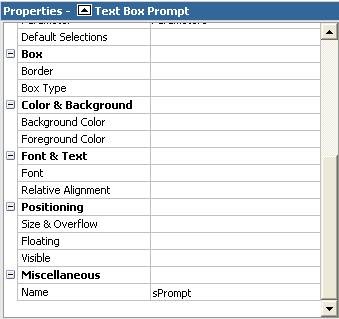
4) Select the prompt object and assign it a name by navigating to the Properties area (bottom left of the page) and entering a value in the Name property, which can be found in the Miscellaneous section at the bottom of the list (this example uses a prompt object named “sPrompt” and this will be referenced in the JavaScript).
clip_image003
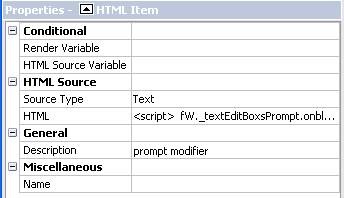
5) And now the fun part! Drag an HTML Item object directly to the right of the prompt. Assign its’ Description property the following value: prompt modifier.
TIP: Adding descriptions to your HTML Items makes it easier to identify them later when more than one is present in the report.
clip_image006
6) Now enter the following code into this HTML Item by either double-clicking it or select the HTML property:
<script>
fW._textEditBoxsPrompt.onblur=validatePrompt;
</script>
This code will make our prompt run the “validatePrompt” function every time it loses focus.
7) Now, we will add a second HTML Item to top of the page to hold our functions. Once the HTML Item is added to the report, describe the item by going to the Description property and typing in “functions”. Your prompt page should now look like the image below:
clip_image008
8 ) The following code will allow users to enter a maximum of five (5) numeric codes separated by commas. Any other characters that are encountered will throw an error. The section for a proper validation was purposely left blank to allow readers to enter their own success message or routine.
<script>
var fW=(typeof getFormWarpRequest == “function” ?
getFormWarpRequest() :document.forms["formWarpRequest"]);
function validatePrompt()
{
str=fW._textEditBoxsPrompt.value;
if (!(str==null||str==”"))
{
str=str.toUpperCase();
str= str.replace(/ /g, “”); // remove all spaces
str= str.replace(/,+/g, “,”); // replace multiple commas by one
str= str.replace(/,$/g, “”); // remove trailing comma
str= str.replace(/^,/g, “”); // remove leading comma
var patvalidchar = new RegExp(“^[0-9,]+$”);
var pat3char=new RegExp(“^([0-9]{1,3},)*$”); // 3 digit code
var pat5char=new RegExp(“^([0-9]{1,3},){0,5}$”); //more then 5 codes

// characters other than numbers were used…
if (patvalidchar.test(str)==false)
alert(“Codes may be comprised of only numbers.”);

// codes are more than 3 digits long and only numeric …
else
{
if (pat3char.test(str + “,”)==false)
alert(“Codes must be at least three digits.”);

// more than 5 codes were entered …
else
{
if (pat5char.test(str + “,”)==false)
alert(“Please enter no more than 5 codes”);

// Enter code here for successful validation …
else
{
return true;
}
}
}
}

// Enter code here if Text Box is Empty …
else
{
alert(“No values entered.”);
}
}
</script>

 ------------------

Source: Irongroupside.com